
An introduction to Headless CMS, its benefits and why your business needs it
7 min read time

GRM Digital
A headless CMS lets you store content in one place and deliver it simultaneously to every channel your customers use. Right now, those customers are browsing your website on a laptop, using your mobile app on the commute, glancing at a digital screen in your showroom, and logging into a partner portal from another continent. A traditional CMS was built to manage a website. It was never designed to serve all of those surfaces at once, and the strain shows.
Headless CMS is the architectural answer that forward-thinking teams are adopting to solve exactly this problem. At GRM Digital, we work with businesses navigating this shift, from discovery and platform selection through to production deployment, and that hands-on experience gives us a grounded view of what works, what gets oversold, and where the real trade-offs lie. This article covers everything you need to make an informed decision: what headless is, why teams choose it, who benefits most, which platforms to consider, and how to assess whether it's the right move for your business.
What a headless CMS actually is
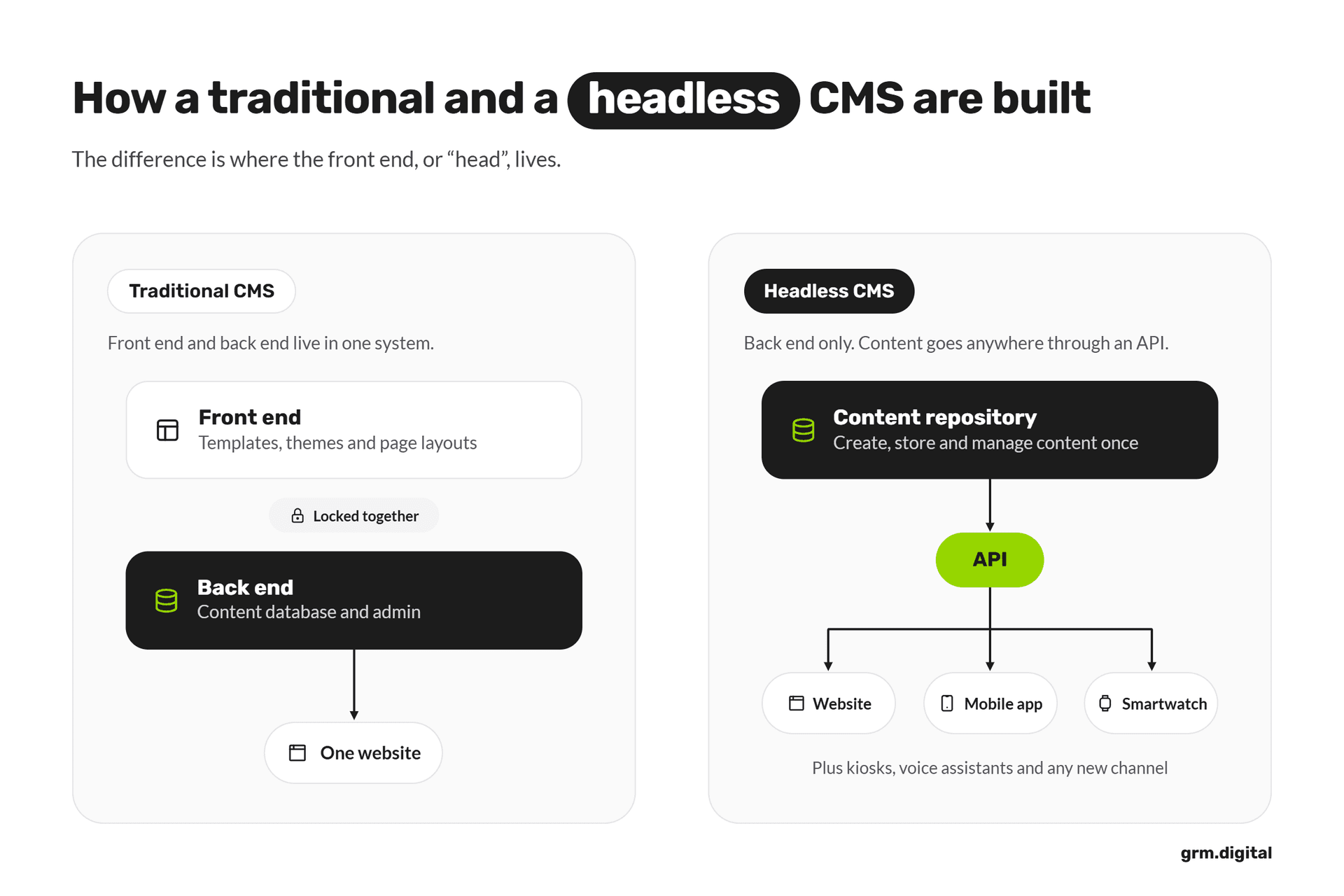
Strip away the jargon and the architecture is straightforward. A headless CMS separates the content repository from the presentation layer. Your content sits in a back-end system, structured and stored, and it is delivered through a content API, typically REST or GraphQL, to whatever front-end application requests it. That might be a website built in Next.js, a mobile app in React Native, a digital signage system, or an in-store kiosk. The CMS has no opinion about how the content is displayed, because it has no built-in display layer at all.
That last point is worth emphasising: headless does not mean the CMS lacks an editorial interface. Your content team still logs in, writes, edits, and publishes through a perfectly functional admin panel. What's absent is the inseparable front end that a traditional CMS uses to render pages. That separation is everything.
Traditional, headless, and hybrid: the key differences
A traditional (or monolithic) CMS controls both what content is and how it renders. WordPress, for example, manages your posts and generates your web pages using built-in themes and templates. It's fast to set up and straightforward to operate, but the content model and the presentation layer are tightly coupled. Reusing that content outside the website requires workarounds that rarely scale gracefully.
A headless, or decoupled, CMS manages what content is, leaving rendering entirely to external applications. Content is written once and delivered via REST or GraphQL APIs to any interface that requests it. A hybrid CMS sits in between: it exposes an API-first architecture while also providing an integrated presentation layer for teams that need both. JAMstack CMS platforms typically sit in this space, pre-rendering content at build time and serving it from a CDN for maximum performance. Each model has its place, and choosing between them depends on your channels, your team, and your growth plans.
The core benefits that make it worth the shift
Performance is often the first number that gets cited, and the data is compelling. Industry benchmarks consistently show that optimised headless implementations can achieve significantly faster Largest Contentful Paint (LCP) times than plugin-heavy traditional CMS builds, in some cases delivering LCP under 1.5 seconds compared to figures of 3 seconds or more for comparable monolithic sites. That gap comes from pairing static generation with CDN delivery, so pages are pre-built and served from the edge rather than rendered on a server for every request. Faster pages mean better user experience and stronger Core Web Vitals scores, both of which matter to search performance.
The bigger strategic win is omnichannel delivery. One well-structured content model can simultaneously serve your website, mobile app, digital signage, email templates, and partner portals. When a product description or campaign message changes, editors update it once and every channel reflects that update automatically. For businesses expanding their digital presence, that kind of content reuse is not a convenience: it's a meaningful operational advantage.
Developer flexibility and faster release cycles
Developers working with a headless CMS stack are free to choose any modern front-end framework: React, Vue, Next.js, Astro, whatever best fits the project. They are not constrained by the CMS's built-in templates, which means custom user experiences are achievable without fighting the platform. According to Storyblok's State of CMS report, front-end flexibility consistently ranks as the leading reason development teams move to a headless approach.
Front-end and content teams can work in parallel, which removes the bottlenecks that plague monolithic builds. Developers can rebuild or redesign the presentation layer entirely without touching the content model or migrating editorial work. That independence shortens launch timelines and makes future redesigns significantly less disruptive.
The honest trade-offs to consider first
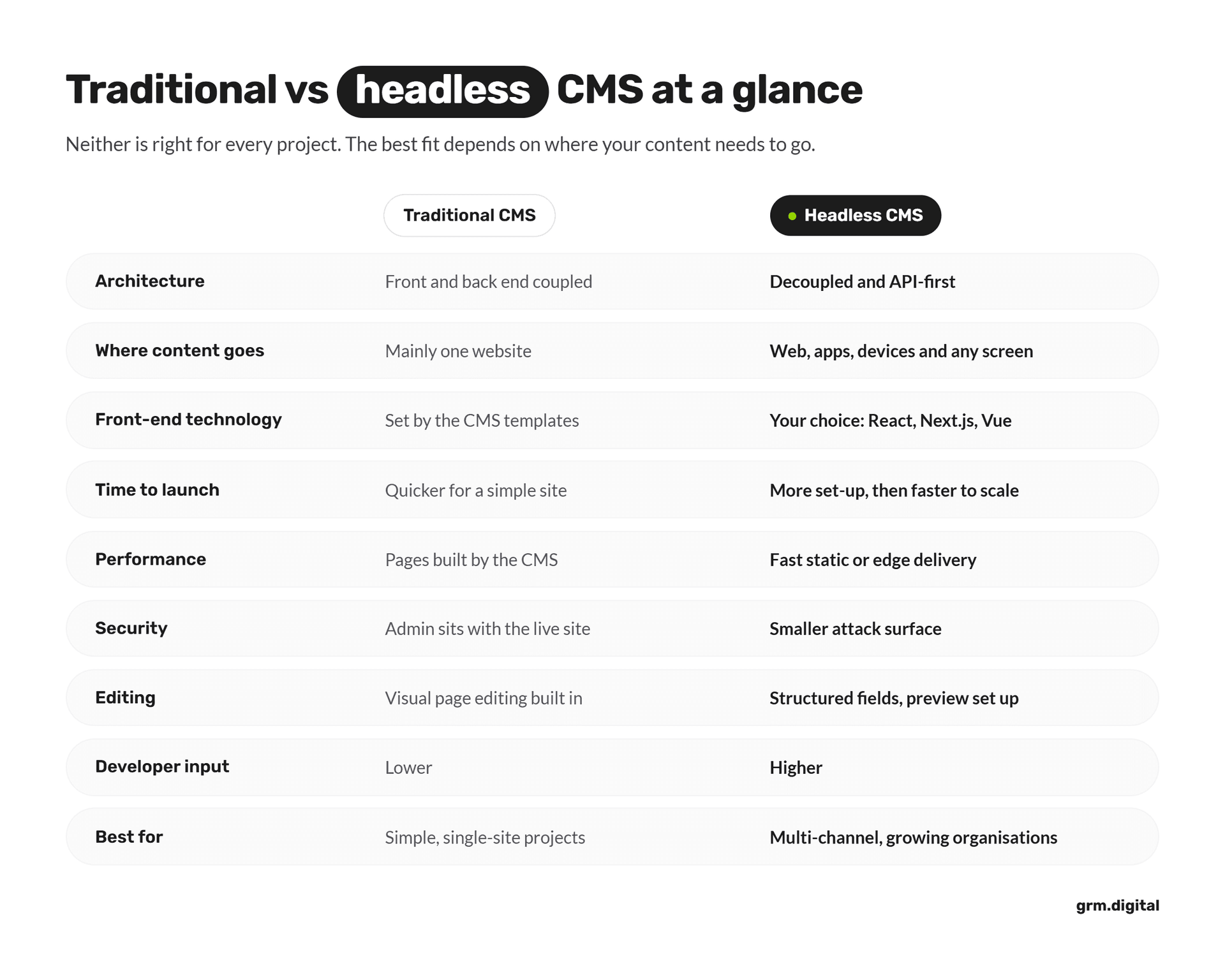
A headless stack is not a simple plug-and-play upgrade. You are assembling several systems: the CMS itself, the front-end application, hosting, search, preview environments, analytics, and deployment pipelines. Each connection point requires configuration, ongoing maintenance, and someone with the technical capability to manage it. For UK SMEs, implementation costs typically range from £8,000 for a small, straightforward site to well over £60,000 for complex builds with e-commerce, integrations, and bespoke functionality. Budget separately for CMS subscriptions, hosting, and developer support on top of that.
Smaller teams without dedicated front-end developers may find the operational overhead significant. In a traditional CMS, a marketer can change a page layout visually in minutes. In a headless setup, the same change may require a developer to adjust component configuration first. That's not a fatal flaw, but it is a real shift in how editorial and development teams work together, and it deserves honest consideration before committing.
When traditional wins
Marketers accustomed to drag-and-drop editors and instant live preview will find some headless platforms less intuitive, at least initially. Hybrid platforms like Storyblok address this by offering visual editing alongside API delivery, which helps bridge the gap. But for a single-language brochure site updated infrequently by a small team, a headless migration can multiply costs and complexity without producing any meaningful return.
Headless is not automatically superior. A well-configured traditional or hybrid CMS remains the sensible choice for simple sites with modest publishing cadences. The strongest case for going headless emerges when your content genuinely needs to move across multiple channels, your front-end requirements are custom, or performance and integration are strategic priorities.
Real use cases: who gets the most value from headless
The clearest examples come from businesses managing content across three or more channels with materially different interfaces. New York's MTA uses a single headless CMS to power its website and approximately 1,800 digital signs across more than 400 stations. The Pac-12 Networks used headless architecture to build over 3,000 landing pages and double video watch time. Samsung Germany moved to a headless model and cut page-update time in half, increasing engagement by 15%.
For SMEs and startups, the case is often about future-proofing rather than immediate scale. A business launching a content hub today can feed that content to a mobile app six months later without restructuring the CMS at all. Leesa, the sleep brand, used a headless setup to personalise editorial content and product recommendations, generating 30 times more traffic from editorial articles. That kind of result comes from integrating the content layer with commerce, CRM, and personalisation systems, which a headless architecture makes technically straightforward.
Enterprises and multi-brand organisations benefit most when the same content must appear across three or more channels with different interfaces, when front-end redesigns need to happen independently of content migration, or when teams in multiple markets and languages need centralised governance without centralised bottlenecks.
Choosing between the main headless platforms
The market splits into managed SaaS platforms and self-hosted solutions, and the right choice depends on your priorities. SaaS platforms like Contentful, Sanity, Storyblok, and Hygraph minimise operational work: upgrades, backups, infrastructure, and availability are handled by the vendor. In exchange, you pay subscription costs and accept a degree of vendor dependency. Self-hosted options like Strapi, Directus, and Payload give you full control over your data and infrastructure, which matters for organisations with data residency requirements or existing technical operations capacity. The trade-off is that your team takes on hosting, security patching, and maintenance.
Matching the platform to your team and use case matters more than chasing the most popular name. Sanity and Payload suit JavaScript-heavy developer teams building tightly integrated applications. Storyblok works well when marketers need visual page composition without sacrificing developer flexibility. Hygraph excels in GraphQL-federated architectures where content must be pulled from multiple systems through a unified content API. Strapi is a sensible open-source starting point with a familiar admin interface and strong community support.
Kontent.ai, Kentico, Contentful and Contentstack are all proven choices for large enterprises that need robust governance, localisation at scale, and enterprise SLAs. WordPress makes sense when editorial maturity, SEO tooling, and organisational familiarity outweigh the simplicity of a purpose-built headless platform. The right answer depends on your team size, technical capability, channel count, and budget, which is precisely where external expertise pays for itself.
How to decide if headless is right for your business
Migration involves more than swapping one CMS for another. Content modelling, API mapping, front-end rebuild, URL preservation, redirect strategy, and SEO continuity all require careful planning. A CDN and edge caching layer in front of public delivery is worth building in from the start, not retrofitting after launch.
Security deserves equal attention. The CMS administration interface should remain private, API access should follow least-privilege principles, and all rich-text and uploaded content should be validated before publication. Enterprise-grade infrastructure protection makes a meaningful difference to both performance and resilience, and it is far easier to implement correctly at the outset than to bolt on later.
Before committing to a headless migration, work through these six questions honestly:
- Does your content need to appear on three or more channels?
- Do different channels require different interfaces or independent release cycles?
- Does your team have front-end development resource, or reliable access to it?
- Is performance, personalisation, or resilience a strategic requirement?
- Are you managing multiple brands, markets, or languages?
- Does your content need to integrate with commerce, CRM, or other business systems?
If most of those answers are yes, headless is likely the right direction. If most are no, a traditional or hybrid CMS will serve you better and cost you less. There is no shame in that conclusion. Good architecture is about fit, not fashion.
The right tool for the right job
A headless CMS is not a universal upgrade. It is the right tool when content needs to move across multiple channels, front-end teams need genuine freedom, and performance or integration is a strategic priority. When those conditions apply, the performance gains, editorial reuse, and long-term flexibility are substantial. When they don't, the added complexity rarely justifies the investment.
The most valuable thing you can do before making a decision is conduct an honest audit of your channels, your team's capabilities, and your actual publishing requirements. Start there, and the right architecture becomes much easier to identify. If you'd like a no-jargon assessment of whether headless fits your business, and the technical expertise to implement it properly if it does, book a discovery call with the team at GRM Digital. We take a technology-agnostic approach, so any recommendation is grounded in what your project genuinely needs, not what happens to be fashionable.