
Manufacturing Website Design: Key Features That Turn Visitors into Enquiries
20 min read time

GRM Digital
An effective manufacturing website design does four jobs. It shows what you make. It proves you can meet the buyer's requirements. It works properly on a phone. And it makes asking for a quote easy.
The ingredients behind those jobs are well known: detailed product specifications, visible sector expertise, evidence of quality and a short, structured enquiry form. Yet many manufacturer sites still miss at least one. Industrial buyers do much of their research before they ever speak to a supplier. If your site can't answer their questions, they move on to a site that can.
Platform choice sits underneath all four jobs. The right technology depends on your catalogue size, the systems you need to connect and the team who will run the site. Headless suits some manufacturers. A well-built traditional CMS or a B2B commerce platform better serves others.
We're GRM Digital. We're technology agnostic, with headless specialists on the team, and we work with global manufacturers including Ingersoll Rand, Gardner Denver and Club Car. We choose the platform once we understand your requirements. This guide covers the features that matter, the proof buyers look for, how to get found in search, the enquiry path and how to choose a platform.
Key takeaways
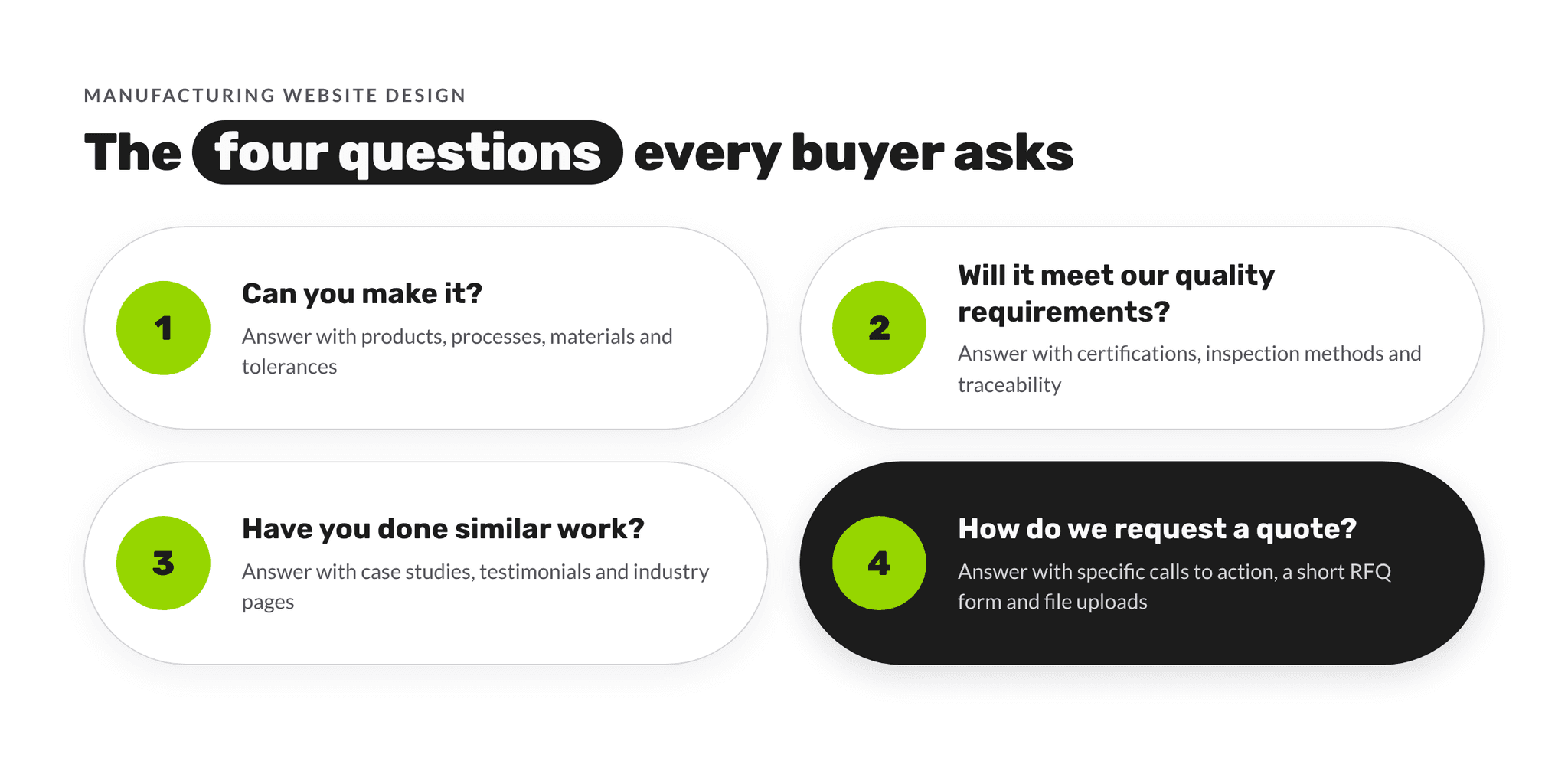
- Four buyer questions. Can you make it? Will it meet our quality requirements? Have you done similar work? How do we request a quote? Build every page around these.
- Specs on the page. Show key specifications in a consistent layout on the product page. PDFs are a useful extra. They shouldn't be the only place the data lives.
- Proof with detail. Case studies, certifications and testimonials carry weight when they are specific, named and current.
- Get found first. Engineers search for materials, processes and part numbers. Pages built around those terms bring in buyers who already know what they need.
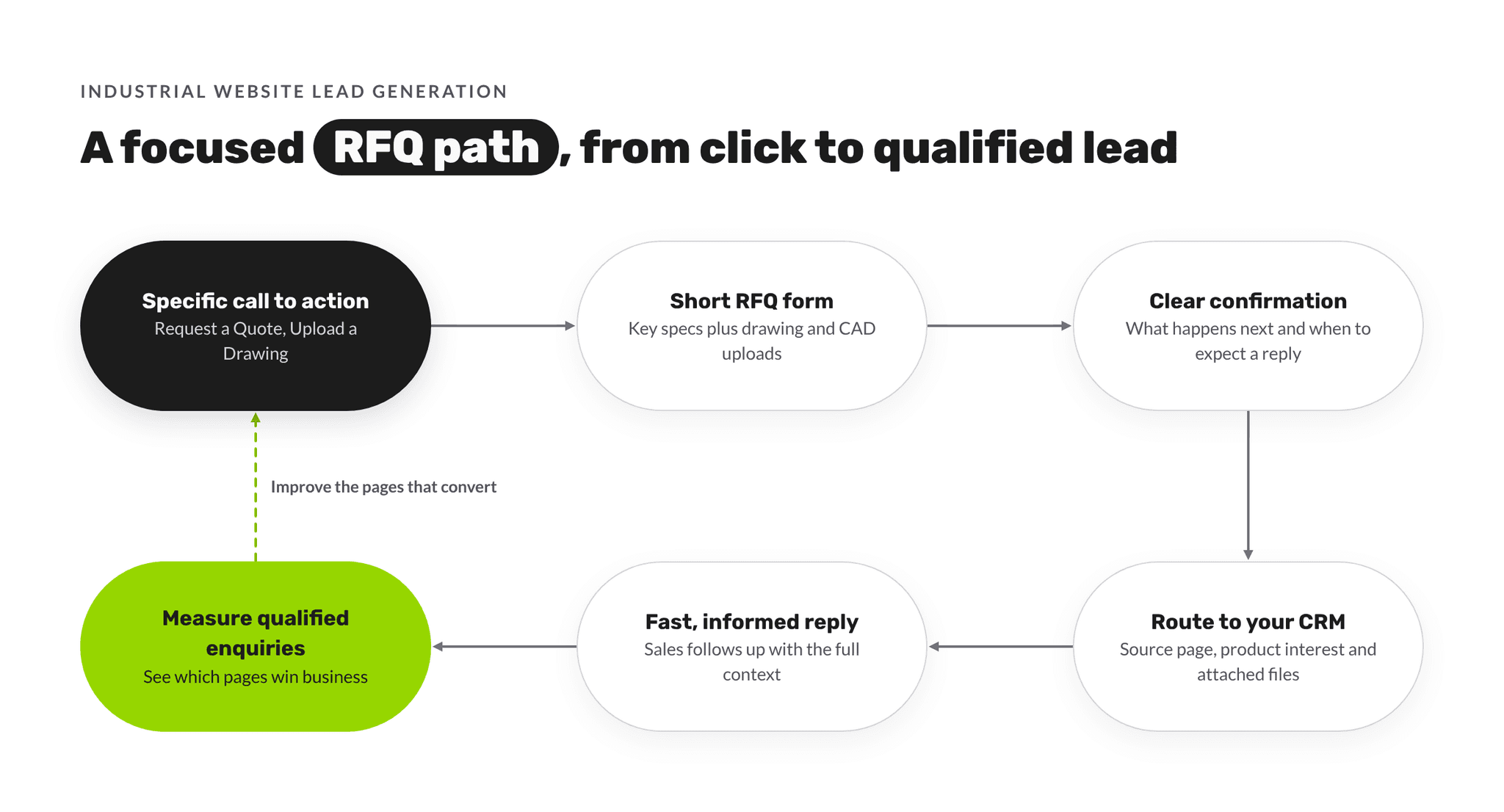
- Focused RFQ path. Fix this first. Use specific calls to action, a short form and file uploads, and route every enquiry to your CRM.
- Platform follows needs. Headless suits specific requirements. Choose it for those requirements and for no other reason.
What makes a manufacturing website design effective for buyers?
Start with the four questions every buyer is asking.
Structure the site around the four questions in the takeaways above. Every page should help answer at least one of them. Anything that answers none of them is clutter, and clutter slows the buyer down.
A useful test is to hand your homepage to someone outside the business for ten seconds. Ask them what you make, who you make it for and how they would ask for a price. If they can't tell you, your buyers can't either.
What belongs on a manufacturer's homepage?
Your homepage should state four things immediately:
- Products. The main product families or manufacturing processes, named in the terms buyers use.
- Capabilities. Key processes, materials, tolerances and volumes, from prototype to production runs.
- Industries served—aerospace, automotive, food and beverage, medical or whichever sectors you supply.
- Value proposition. One clear statement of why a buyer should choose you. Make it specific. "ISO 9001 certified precision machining with 10-day lead times" says far more than "quality you can trust".
Below that, add a short proof strip: client logos, key certifications and a headline figure such as years in business or parts produced. Finish with a visible route to request a quote.
How should navigation be structured?
Keep navigation simple and consistent. A structure that works for most manufacturers is Products, Capabilities, Industries, Quality, Resources, About and Contact. Add breadcrumbs so buyers always know where they are in a large catalogue.
Name menu items in your buyers' language. Internal product codes and brand names mean little to a first-time visitor. Group items by what the buyer is looking for, such as product type, process, or industry. Keep the quote button in the header so it is visible on every page.
What can you borrow from strong manufacturing website design examples?
Study patterns on well-regarded manufacturer sites and borrow them. You don't need to copy the look. A 15-person machining firm doesn't need Caterpillar's catalogue structure. It can still use the same clear entry points.
- Tymetal: educational product content
- CS Coil: clear product-category layouts
- Kuraray: multiple ways to find products
- PumpWorks: organised technical documents
- Protolabs: clear conversion paths
- Caterpillar: region-based entry points
- Marlin Steel: video-led storytelling and an easy-to-find quote request
In practice, a small manufacturer can turn these into three actions. Write short educational pieces beside key products, as Tymetal does. Group products into clearly labelled categories, as CS Coil does. Keep the quote request visible from every page, as Marlin Steel does.
Where do most manufacturer sites go wrong?
The same failures appear on many manufacturer sites. Each one can discourage enquiries:
- Vague homepage claims. Phrases such as "high-quality manufacturing" with no detail give buyers nothing to assess.
- Buried quote buttons. If the quote request sits three clicks deep, many buyers won't find it.
- Specifications locked inside PDFs. Search engines index them poorly, and they are hard to read on a phone.
- Outdated certifications. An expired badge raises doubts about everything else on the page.
- Stock photography. Generic factory images tell buyers nothing. Real photos of your machines, people and parts do.
- Slow pages. Large uncompressed images and heavy scripts slow spec pages, especially on site or on a trade show floor.
- No clear next step. Pages that end without a call to action leave interested buyers with nowhere to go.
What product and technical information do buyers expect to find?
How much detail is enough on a product page?
Enough that an engineer can decide without phoning you. A complete product page includes:
- A plain-language description of what the product does
- Typical applications and the industries it serves
- Variants and part numbers
- Materials and finishes
- Dimensions and tolerances
- Performance limits such as pressure, temperature, load or speed
- Lead times and minimum order quantities
- Compliance and certification information
Show key specifications on the page itself in a structured table. Use the same layout and units across every product so buyers can compare alternatives at a glance. If you sell into several markets, show both metric and imperial units where buyers expect them.
Good photography matters here too. Show the product from several angles, in use where possible and with a sense of scale. A short video of a part in operation can answer questions a spec table can't.
Which resources should be downloadable?
Offer the files buyers need to specify and approve your product:
- Datasheets
- CAD files and 3D models in neutral formats such as STEP or IGES
- 2D drawings
- Installation and operating manuals
- Safety data sheets
- Certificates of conformity and test reports
Place each download beside the relevant product so buyers find it where they need it. A searchable resources library can still be useful alongside that, especially for maintenance teams looking for older manuals. Label every file with its type, version and file size so buyers know what they are getting before they click.
Think carefully before putting downloads behind a form. Asking for an email address in exchange for a basic datasheet frustrates engineers. Gating can work for in-depth guides aimed at earlier-stage prospects.
How do different buyers look for information?
A single purchase often involves several people. Each role arrives with different questions, so cover each of them:
- Engineers: tolerances, CAD files, compatibility
- Procurement: part numbers, certifications, lead times
- Quality teams: inspection methods, traceability
- Maintenance teams: manuals, spare parts
- Distributors: packaging, ordering data
You don't need a separate site for each role. You do need each role to find its answers within a click or two of the product page.
How should search and filtering work on a large catalogue?
For larger catalogues, add site search and filtering by the attributes buyers think in: material, size, capacity, pressure rating or application. Buyers who can narrow a range themselves reach the right product faster.
Make site search forgiving. It should handle part numbers, partial matches, common misspellings and competitor cross-references where you can offer them. Track what people search for. Searches that return no results show you gaps in your catalogue content.
Where should your product data live?
As a catalogue grows, keeping specifications consistent across the website, datasheets and distributor feeds gets harder. Many manufacturers hold product data in an ERP or a product information management (PIM) system. Connecting the website to that single source keeps specs accurate and saves your team from updating the same figure in several places.
This is one of the most common reasons manufacturers look at headless and composable platforms. We cover that in the platform section below.
How do you show sector expertise and build trust?
Industrial buyers take on real risk when they choose a new supplier. A late or faulty part can stop a production line. Your website has to reduce that perceived risk before a buyer will pick up the phone.
Why do case studies carry more weight than claims?
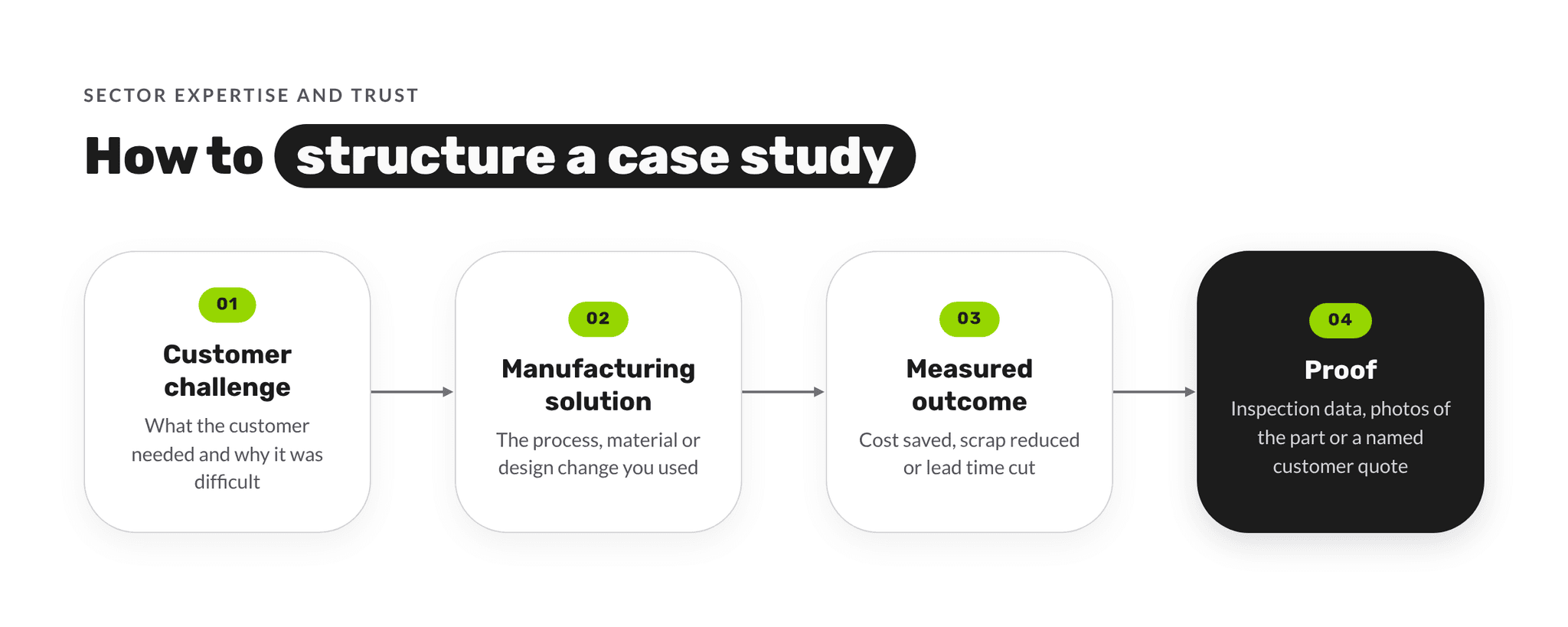
A case study gives evidence. A claim on its own is only an assertion. Structure each case study in four parts:
- Customer challenge. What the customer needed and why it was difficult.
- Manufacturing solution. The process, material or design change you used.
- Measured outcome. The result in numbers, such as cost saved, scrap reduced or lead time cut.
- Proof. Before-and-after data, inspection results, photos of the part or a quote from the customer.
Organise case studies by industry and application so prospects can quickly find comparable work. Link each one from the relevant product, capability and industry pages. A case study that only lives on an "Our work" page will be read far less often.
If customer confidentiality limits what you can publish, anonymise it. "A tier-one automotive supplier" with real figures is still more convincing than a general claim.
How should certifications be presented?
Go beyond a row of logos. For each certification, state the standard, the scope, the issuing body and the validity date, and link to the certificate itself. Then explain what it means for the buyer: traceability, process control or audit readiness.
The same approach works for ISO 9001, ISO 14001, AS9100 and IATF 16949. Set a reminder to review the quality page each time a certificate is renewed. Remove expired credentials straight away, because an outdated badge undermines everything around it.
What makes a testimonial believable?
A believable testimonial includes a named customer, their job title and company, and a specific result. Reduced downtime, a tight delivery schedule met, or a first-time-right approval are all good examples. A line like "Excellent supplier" proves nothing.
Place testimonials beside the relevant capability or industry page so they support the claim they sit next to. Always get written permission for names, logos and figures. Short video testimonials filmed on site can be especially persuasive.
Why build industry landing pages?
A buyer in medical devices wants to see that you understand medical devices. An industry page shows that. It brings together the relevant products, certifications, case studies and testimonials for one sector, written in that sector's language.
Each industry page should cover the sector's typical challenges, the standards that apply, the products and processes you use for it and the evidence that you've done it before. These pages also tend to perform well in search, because buyers often search by sector.
What technical content builds authority?
Technical content shows buyers you know your subject. Useful formats include:
- Application guides that explain how to choose between options
- Material and process comparisons
- Design-for-manufacture tips that help engineers avoid costly mistakes
- Answers to frequently asked technical questions
- Short explainer videos from your own engineers
Write for the engineer, with real numbers and clear trade-offs. Content that helps a buyer make a better decision earns trust, and it gives your sales team something useful to share.
How do buyers find a manufacturing website in the first place?
A well-designed site only produces enquiries if the right people reach it. For most manufacturers, organic search is one of the most valuable sources of qualified traffic. Buyers who search for a specific process or part are often close to a decision.
Which searches should you target?
Industrial buyers rarely search for broad terms like "manufacturer". They search for what they need, for example:
- A process and material, such as "5-axis aluminium machining"
- A product with a specification, such as "stainless steel ball valve DN50"
- A part number or a competitor's equivalent
- A sector need, such as "food-grade conveyor components"
- A location or capability, such as "sheet metal fabrication UK"
These searches have lower volumes than consumer keywords. They make up for it with strong intent. A page that matches one exactly can attract buyers ready to request a quote.
How should pages be built for search?
Give each product, capability and industry its own page with a clear focus. Use the terms buyers search for in the page title, the main heading and the opening paragraph. Keep spec tables as HTML text on the page so search engines can read them.
Good technical foundations help every page:
- Descriptive, readable URLs that follow your site structure
- Unique title tags and meta descriptions for every page
- Structured data for products, organisations and FAQs
- Descriptive alt text on product images
- Internal links between related products, case studies and industry pages
- Fast load times and a clean mobile layout
What about AI search and answer engines?
More buyers now use AI assistants and AI-generated search summaries for early research. These tools favour content that answers questions directly and clearly. The same practices that help engineers also help here: clear headings phrased as questions, direct answers in the first sentence and specific facts in structured tables. An accurate, well-organised website gives AI tools reliable information to draw on when they describe your business.
Do multi-region sites need extra care?
Yes. If you sell in several countries, plan your structure for each region and language from the start. Use hreflang tags so search engines show the right version to the right audience. Translate the specification data, calls to action, and marketing copy. Check that units, certifications and contact details are correct for each market.
How should mobile usability and enquiry forms work together?
Why does mobile still matter for a B2B industrial buyer?
Buyers check specs on the shop floor, at trade shows, on customer sites and between meetings. Fast loading, readable spec tables and tap-to-call contact details are the baseline. If a table is unreadable on a phone, the buyer may drop the enquiry or look at another supplier.
A few practical checks make a big difference:
- Spec tables that scroll sideways inside their own container, or stack into cards on small screens
- Buttons and links large enough to tap with a gloved or busy hand
- Downloads that open cleanly on a phone, with file sizes shown
- A quote button that stays in reach as the buyer scrolls
- Forms that use the right keyboard for each field, such as a number pad for quantities
What does a good RFQ form ask for?
Ask only for what your team needs to give an accurate quote:
- Product or process
- Material
- Quantity, including annual volumes if relevant
- Tolerances or key specifications
- Required delivery timeline
- Contact details
Let buyers upload drawings and CAD files directly in the form. Accept the formats they actually use, such as PDF, DXF, STEP and IGES, and state the maximum file size. Nothing frustrates an engineer more than a form that rejects the drawing they need to send.
Keep the overall path low-friction. Offer a short form for general questions and a more detailed RFQ for high-intent buyers. Give separate routes for sample requests, technical support and callbacks so each enquiry reaches the right person. Where a form has many fields, split it into two or three short steps.
Which calls to action actually get used?
Specific wording such as "Request a Quote", "Upload a Drawing" or "Talk to an Engineer" is often clearer than a vague "Contact Us". Test it on your own site to see what your buyers respond to.
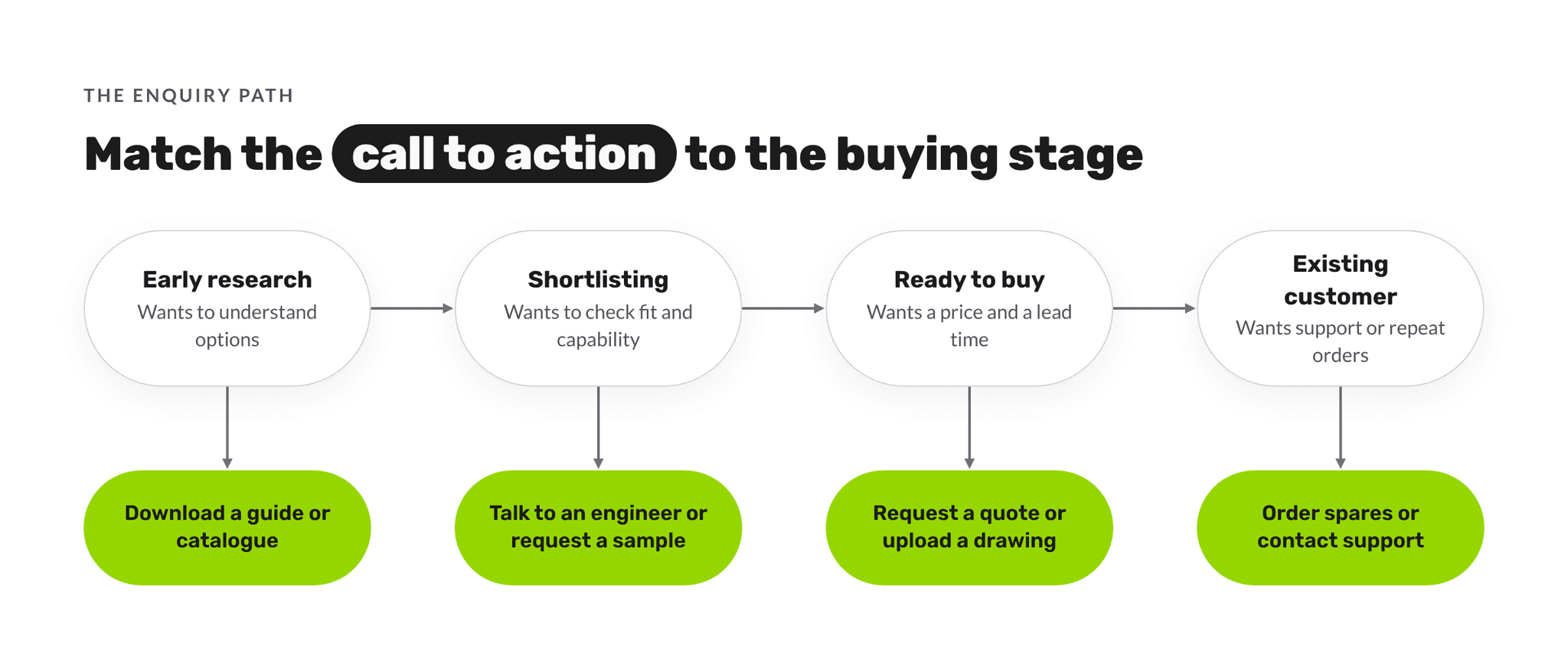
Match the call to action to the buying stage:
- Early research (to understand options): download a guide or catalogue
- Shortlisting (to check fit and capability): talk to an engineer, request a sample
- Ready to buy (a price and a lead time): request a quote, upload a drawing
- Existing customer (support or repeat orders): order spares, contact support
What should happen after a buyer submits an enquiry?
Tell visitors what happens next on the confirmation page and in the confirmation email. Give a realistic response time, such as "An engineer will review your drawing and reply within one working day". Then meet it. A fast, informed reply is often what wins the order.
Route every enquiry to your CRM with the source page, the product interest and any attached files. This lets you see which pages produce qualified leads, beyond a simple count of submissions. It also gives your sales team full context before they reply. This is the practical core of industrial website lead generation: knowing where qualified enquiries come from and following them up quickly.
Why do performance, accessibility and security matter?
These three areas rarely appear in a buyer's checklist. They still shape whether a buyer stays on your site and trusts what they find there.
How fast should a manufacturing website be?
Fast enough that spec pages and product images load quickly on a mobile connection. Google's Core Web Vitals give you a practical benchmark for loading speed, responsiveness and visual stability. They also feed into how Google assesses page experience.
Common causes of slow manufacturer sites include oversized images, heavy third-party scripts, and unoptimised hosting. Compress and resize images, serve them in modern formats and use a content delivery network. Review your plugins and tracking scripts regularly and remove what you no longer use.
What does accessibility mean for an industrial website?
An accessible website works for everyone, including people who use screen readers, keyboard navigation or magnification. Aim to meet the WCAG 2.2 AA guidelines. In practice, that means:
- Sufficient colour contrast for text and buttons
- Proper heading structure on every page
- Alt text on meaningful images
- Data tables marked up with headers.
- Forms with clear labels and helpful error messages
- Full keyboard access to menus, filters and forms
Accessibility also supports search performance, and many large customers now expect it from their suppliers.
How should a manufacturing website handle security?
Buyers upload confidential drawings and commercial details through your forms. They need to trust that data is safe. Serve the whole site over HTTPS. Keep your CMS, plugins and dependencies up to date. Scan file uploads, store them securely and limit who can access them. Add bot protection to forms to reduce spam without blocking real buyers.
If you supply defence, aerospace or other regulated sectors, your customers may ask about your security practices. A well-maintained website is part of that answer.
Which platform suits your manufacturing website, and when does headless make sense?
What are your main platform options?
There are three broad routes. A traditional CMS such as WordPress manages content and presentation in one system. An ecommerce or B2B commerce platform is built around catalogues, pricing and online ordering. Headless separates the front end from the content management system and connects them, and other business systems, through APIs.
Cost and integration capability vary by platform, extensions, and build. Treat the comparison below as a starting point.
- Catalogue size: traditional CMS, small to moderate; B2B commerce, moderate to large and transactional; headless, large or complex.
- ERP, PIM, CRM integration: traditional CMS, varies by plugins, APIs and build; B2B commerce, strong for ordering systems; headless, deep and flexible.
- Speed and mobile performance: traditional CMS, depends on build; B2B commerce, depends on platform; headless, highly controllable.
- Editorial flexibility: traditional CMS, easy built-in editing; B2B commerce, product-focused; headless, needs careful set-up.
- Multi-region or language: traditional CMS, possible but can get unwieldy; B2B commerce, varies; headless, strong content reuse.
- Build and running cost: traditional CMS, depends on scope and build; B2B commerce, depends on scope and platform; headless, depends on scope and usually needs more engineering.
When is headless technology genuinely useful?
Headless is a strong fit when you have:
- A large or complex catalogue with many variants
- Product data held in a PIM or ERP that must stay in sync with the website
- Several sites, brands, regions or languages sharing the same content
- Performance-critical or highly custom experiences, such as product configurators
- Plans to publish the same content to other channels, such as distributor portals or apps
It's a poor fit for a small brochure-style site with a few dozen pages and a small in-house team. In that case, a well-built traditional CMS may be simpler to maintain. Headless needs more front-end engineering and ongoing maintenance. Choose it when a specific requirement calls for it.
What does composable mean?
Composable takes the headless idea a step further. You assemble your digital platform from specialist services, such as a headless CMS, a search service, a PIM and a CRM. Each one does its job well and can be replaced without rebuilding the whole site. For a growing manufacturer, that flexibility can make it easier to add new regions, product lines or ordering features over time.
How do you choose a solution based on your requirements?
- List your buyer journeys and must-have features. Start with the four buyer questions and your enquiry path.
- Map the systems the site must connect to. Include your ERP, PIM, CRM, marketing automation and any distributor platforms.
- Decide who will update content, and how often. A platform your team finds hard to use will soon go out of date.
- Growth plan. Consider new regions, languages and product lines over the next three to five years.
- Shortlist platforms against those needs. Compare total cost of ownership, including hosting, licences, support and future development.
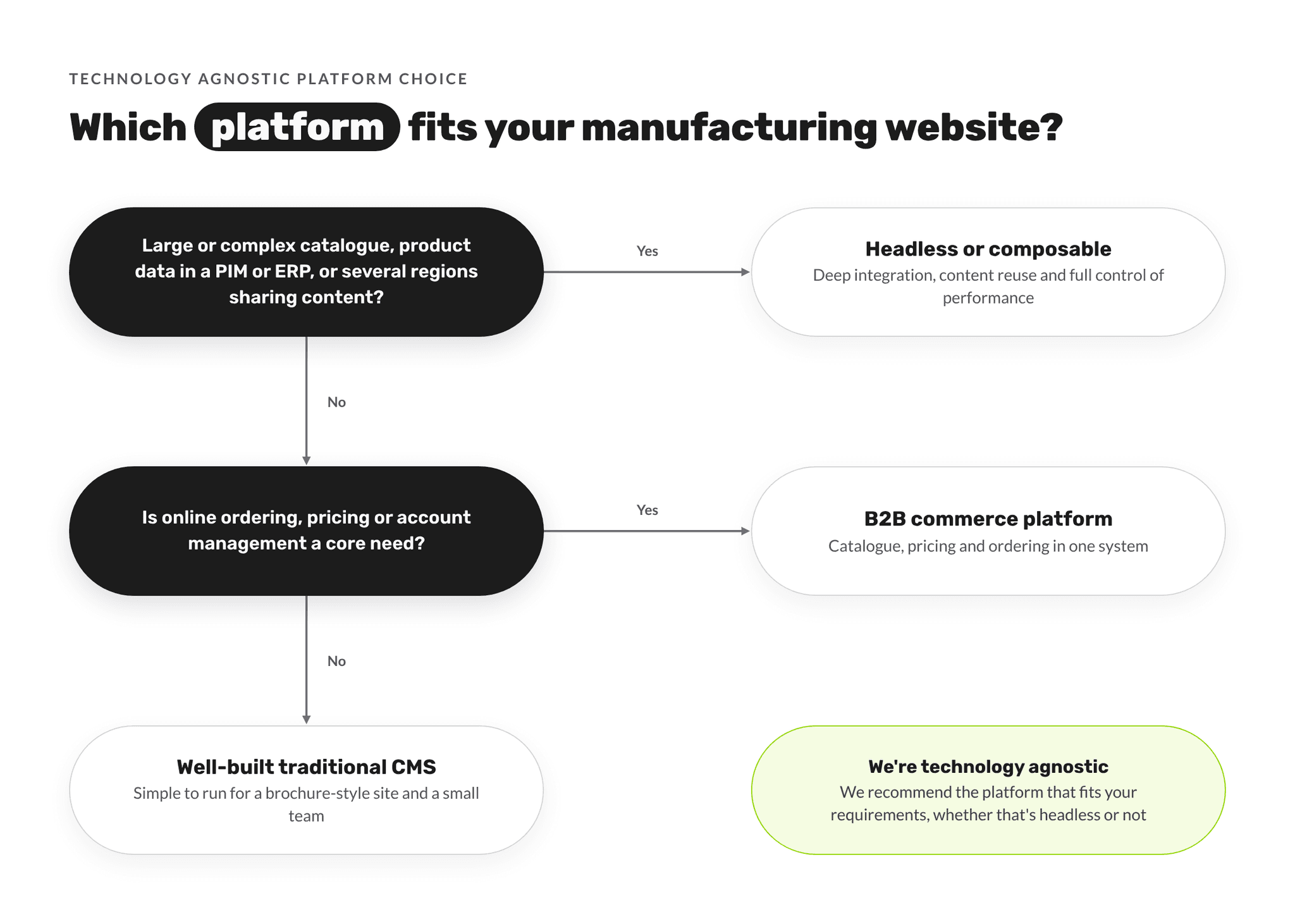
This is where we come in. We're technology agnostic, with headless specialists on the team. We find the right solution for your needs, not the one that suits partner politics. Our partners include Kontent.ai, Umbraco, Kentico, Contentful, Sanity, Algolia, Salesforce and HubSpot. We're also one of just four Platinum Kontent.ai partners in the UK. That breadth means we can recommend the platform that fits your requirements, whether that's headless or not.
Bring your current site, catalogue and enquiry process to a planning conversation with GRM Digital.
How do you measure whether your website is working?
Launch is the start of the work. A manufacturing website improves through regular review of real data, and small changes to high-traffic pages often deliver the biggest gains.
Which metrics matter most?
Focus on the numbers that connect to revenue:
- Qualified enquiries by source page: which pages bring in real opportunities
- Enquiry-to-quote and quote-to-order rates: whether website leads turn into business
- RFQ form completion rate: where buyers drop out of the enquiry path
- Downloads of datasheets and CAD files: which products engineers are actively specifying
- Organic search visibility for key terms: whether buyers can find you
- Site search terms and zero-result searches: gaps in your catalogue content
- Page speed and Core Web Vitals: whether performance is holding up
Traffic and page views are useful context. They don't tell you whether the site is generating business.
How often should you review the site?
Review enquiry data monthly with your sales team. They know which leads turned into orders, and that feedback shows which pages are working. Run a fuller review each quarter covering search performance, page speed, content accuracy and certifications.
Use what you learn to test improvements. Try a different call to action on a key product page. Shorten a form. Add a case study to an industry page. Measure the effect, keep what works and move on to the next change. That cycle of continuous improvement is how a good website becomes a reliable source of new business.
Conclusion: build your manufacturing website design around the buyer's questions
The essentials are clear. Buyers need simple navigation, detailed specs and downloads, real proof of capability, a focused RFQ path and strong mobile performance. Search visibility brings them to the site. Measurement shows you what to improve next. Platform choice follows all of those requirements, and headless suits some manufacturers but not others.
Your next step is practical. Audit your site against the four buyer questions, then look at the quote path first. It's the most likely place for enquiries to be leaking out, and often the quickest to fix.
We work closely with our clients to build long-lasting relationships based on trust, success and continuous improvement. Several of our clients have been with GRM for over 10 years. If you want to discuss a manufacturing website design project, contact our team at GRM Digital on [email protected] or +44 (0) 203 397 4155.
Frequently asked questions
Where should we start if our manufacturing website is not generating enough enquiries?
Start with your quote request path. Make calls to action visible and specific, keep the form short and let buyers upload drawings or CAD files. Then check that every enquiry reaches the right person quickly.
Should we put product specifications in PDFs or on the website?
Put key specifications on the product page in a structured table. Use a consistent layout across products and place downloadable resources beside the relevant product. PDFs work well as a supporting download.
How can we tell which pages generate qualified enquiries?
Route enquiries to a CRM with the source page and product interest. Review the data with your sales team each month. This shows you which pages produce qualified leads, beyond a simple count of submissions.
Does a small manufacturer need a headless website?
Not usually. A small manufacturer with a brochure-style site and a small in-house team may find a traditional CMS simpler to maintain. Headless requires more front-end engineering and ongoing maintenance, so choose it only when you have a specific need.
Should we gate our technical downloads behind a form?
Keep core datasheets, drawings and CAD files open. Engineers need them to specify your product, and a form gets in the way. Gating can work for in-depth guides aimed at earlier-stage prospects.
How long does a manufacturing website project take?
It depends on catalogue size, the number of integrations and the amount of new content. A focused site on a traditional CMS can take a few months. A large multi-region build with ERP or PIM integration will take longer. A clear requirements phase at the start keeps the timeline realistic.
Can we improve our existing website or do we need a rebuild?
Often you can improve a lot without a rebuild. Better product pages, a clearer RFQ path and up-to-date proof can all be added to most platforms. A rebuild makes sense when the platform can't support your catalogue, integrations or performance needs.
How do we make our website work for international buyers?
Plan a clear structure for each region and language, and use hreflang tags so search engines show the right version. Translate specifications and calls to action as well as marketing copy. Check that units, certifications and contact details are correct for each market.